
• About Us
  • About Amicell
  • Support
  • Find a Dealer
  • Order
Amicell - Vencon
0
  • Home
  • Products
  • Features
  • Info
    • Application Notes
    • Battery Articles
    • Battery Expert Q&A
    • Solutions
    • FAQ
    • News
  • Applications
    • Medical Devices
    • Repair Shop
    • Drone/Multicopter
    • Communications
    • Quality Control
    • R&D Battery Testing
    • High Volume Analysis
  • Contact Us
0
was successfully added to your cart.

Cart

Communications

  • 0

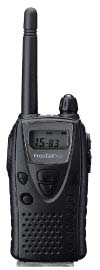
If you use two way radios or cell phones you know that the older the battery the less the talk time. The UBA5 can be used to recondition your batteries and/or test them, depending on the type of batteries.

NiCd or NiMH

Most 2-way radios still use NiCd or NiMH batteries for their reliability and low cost. The service life of these batteries can be quite long (hundreds of cycles). Unfortunately this long life isn’t normally realized due to abuse of the battery, either through inadequate charging or overcharging. The UBA5 can cycle and recondition these batteries restoring some of the lost capacity. The UBA5 software comes with reconditioning routines that you can use on your batteries But, if the battery is in really poor shape (the internal separator or electrolyte has deteriorated) there is nothing that our product nor any other product can do to restore the battery to its rated specification.

Lithium Ion or Lithium Polymer

All new cell phones now come with Lithium batteries. They are smaller and lighter then NiCd or NiMH batteries. As the battery gets older, its internal resistance increases. As the battery’s internal resistance increases the battery can supply less power during heavy loads and the talk time decreases. Although the UBA5 can’t reverse the aging process, it can test the battery’s internal resistance, allowing you to track and predict when it’s time to replace the battery.

  • Next Project
windows 8 compatibleWindows 10 Compatible
(& Linux under Wine)

News

  • WiFi connectivity now available!

    Control your UBA5 with over your WiFi or Ethernet network.

  • Demo S/W with simulated UBA5 available

    Install instructions…

  • Labview drivers Available

    Read More…

Solutions

  • Battery Life Testing

    Use the UBA5 for battery life time testing.

  • Production Testing of Batteries

    One click battery testing for production environments.

Battery Articles

  • Shipping Lithium Ion Batteries

    UN3480: Lithium ion batteries must be shipped at 30% State of Charge (SOC) or less.

  • Standard vs Trickle Charging NiCd and NiMH Batteries

    Two methods of NiCd and NiMH charging — standard and trickle.

  • Preventing Battery Failures

    The key to preventing battery failures is to minimize any misuse and to track their capacity and other key characteristics.

Application Notes

  • Increase Charge Current With an External Power Supply

    Download as pdf file The standard UBA5 can charge at 2A maximum per channel or 4A if you parallel both channels (or even more if you parallel channels from multiple UBA5s). You can charge at higher currents by having your UBA5 control an external power supply using its digital outputs. This application note explains how. Circuits The digital outputs on Acessory1 can be used to control the charge current either directly if your power supply supports that feature, or by using either of the circuits below. The circuit below uses a P-Channel MOSFET (or you can use a PNP bipolar transistor with appropriate resistors). Notes: Choose R1 and R2 such that VGS is 10 to 15V when Q1 is on. To handle a wider variety of power supply voltages you can parallel a 15V zener diode with R2. The circuit below uses an electronic relay: Notes: This circuit drives the electronic relay directly off of the UBA’s digital output. If the UBA’s digital output is insufficient to control the relay, then add a drive transistor. A mechanical relay can be used in place of the electronic relay, but a drive transistor will be required, and you will not be able to use PWM charging (explained below). In either circuit, a “high” on the UBA digital output will connect the external power supply to the battery. Note, you must either use a power supply with a current limit or add a resistor in series to limit the charging current to a safe value for your battery. The power supply can be setup in either of two ways: 1) The output voltage can be set so that it’s the appropriate charge voltage for the battery, for example, the power supply’s voltage is set to 12.6V for a three cell lithium cell battery (3 x 4.2V). 2) The output voltage is set higher then the charge voltage of the battery. The UBA will then control the charge current by altering the duty cycle of the charging pulses (PWM). This method is better in that the UBA knows the charge current during the constant voltage phase and hence knows when the battery is fully charged. Calibration File Modifications To control the digital outputs, we need to add some lines to the UBA’s calibration file. Specifically an External Charge Device that specifies the charge current and an External Charge Control that specifies how the charge relay (or transistor) is controlled. External Charge Device The lines below describe an External Charge Device with name My3ACharger and a power supply with a 3A constant current. *ExtChargeDevice: name model aichan do Ro limit control Iin0 Vout0 Vout0ExtChargeDevice: My3ACharger 5 -1 x 0 100 ERelay1 3 0 External Charge Control The lines below describe an electronic relay with name ERelay1 that is controlled by digital output ‘0’ and is active high (the ‘i’ in ‘xi’). *ExtLoadControl name model dochan maxamps ExtChargeControl: ERelay1 2 xi ! 0 More information on using external devices for control can be found in our External Devices Manual (available on the Support page of our website). UBA S/W: The latest version of UBA S/W (version 2.00B4 Released December, 2019) supports constant voltage charging using an external power supply and an electronic relay controlled by a digital PWM signal from the UBA. In the charging action you would select the Digital Ou tput option (Digital OP) as shown here: Leave the parameter field (“A0.5,1.0,2.0”) default. More information on the parameter field can be found in the help file (click “Help” to access it). And select the External charge control and device as shown: Then when starting the battery analysis you would select the appropriate external charge control and device as shown below: That’s it, now start the analysis.

  • Increase Discharge Power with a Series Resistor

    By adding a series power resistor you can triple the power dissipation of your UBA5.

  • Running Under Linux

    Run on Linux under Wine.

  • External Battery Discharger

    Do-it-yourself UBA5 controlled external battery discharger.

Battery Q&A

  • NiCd Cadmium Migration, Ni-Cd Battery Charging
  • Pulse Charging or “Reflex Charging”
  • Combining NiCd Battery Packs
  • Storing NiCds
  • Overdischarging a Cell
  • Damage from Discharging NiCd/NiMH cells to Less than 1V
  • Testing Individual Cells of a Battery Pack

©All rights reserves to Amicell – Amit Industries Ltd +972 8 8561612

    • Home
    • Products
    • Features
    • Info
      • Application Notes
      • Battery Articles
      • Battery Expert Q&A
      • Solutions
      • FAQ
      • News
    • Applications
      • Medical Devices
      • Repair Shop
      • Drone/Multicopter
      • Communications
      • Quality Control
      • R&D Battery Testing
      • High Volume Analysis
    • Contact Us
    • About Us
    • About Amicell
    • Support
    • Find a Dealer
    • Order